

A template is your target schema — the columns the import agent is trying to fill, plus the rules each one has to pass.Documentation Index
Fetch the complete documentation index at: https://docs.vern.so/llms.txt
Use this file to discover all available pages before exploring further.
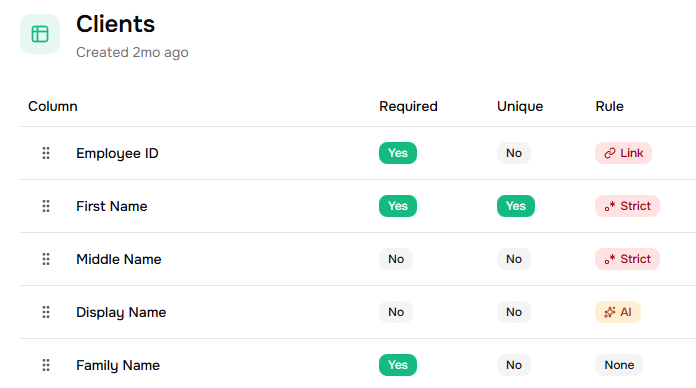
Create one
Go to Templates and click Create template. Upload a CSV of clean sample data. Vern reads it and drafts:- A column for each field, with a name and description.
- A validation rule for each column.
Rule types
Each column has one of these rules:- None — accept any value. Use sparingly; the agent gets less context.
- AI — does this value match the column’s description? Flexible, good for free-form fields (names, addresses).
- Strict — must match a pattern or a fixed list (e.g. department names, country codes).
- Link — must exist in another template’s column. Use for foreign keys (assignee → employee table).
Manual edits stay manual
If you hand-edit a validation rule, Vern won’t overwrite it when you next edit the description or re-generate the template. The system treats your manual rule as the source of truth.Use them
Templates plug into:- Workbook sheets — every sheet has one template assigned. That’s what the import agent maps to and what’s validated against.
- The Create-Company API — pass
template_idsto control which sheets a new company starts with.
Next
- How import works — what the agent does with your template.
- Spot-check and fix — handle anything that failed validation.