> ## Documentation Index
> Fetch the complete documentation index at: https://docs.vern.so/llms.txt
> Use this file to discover all available pages before exploring further.
# Webhooks
> Stream cleaned workbook data into your app over Svix-delivered webhooks.
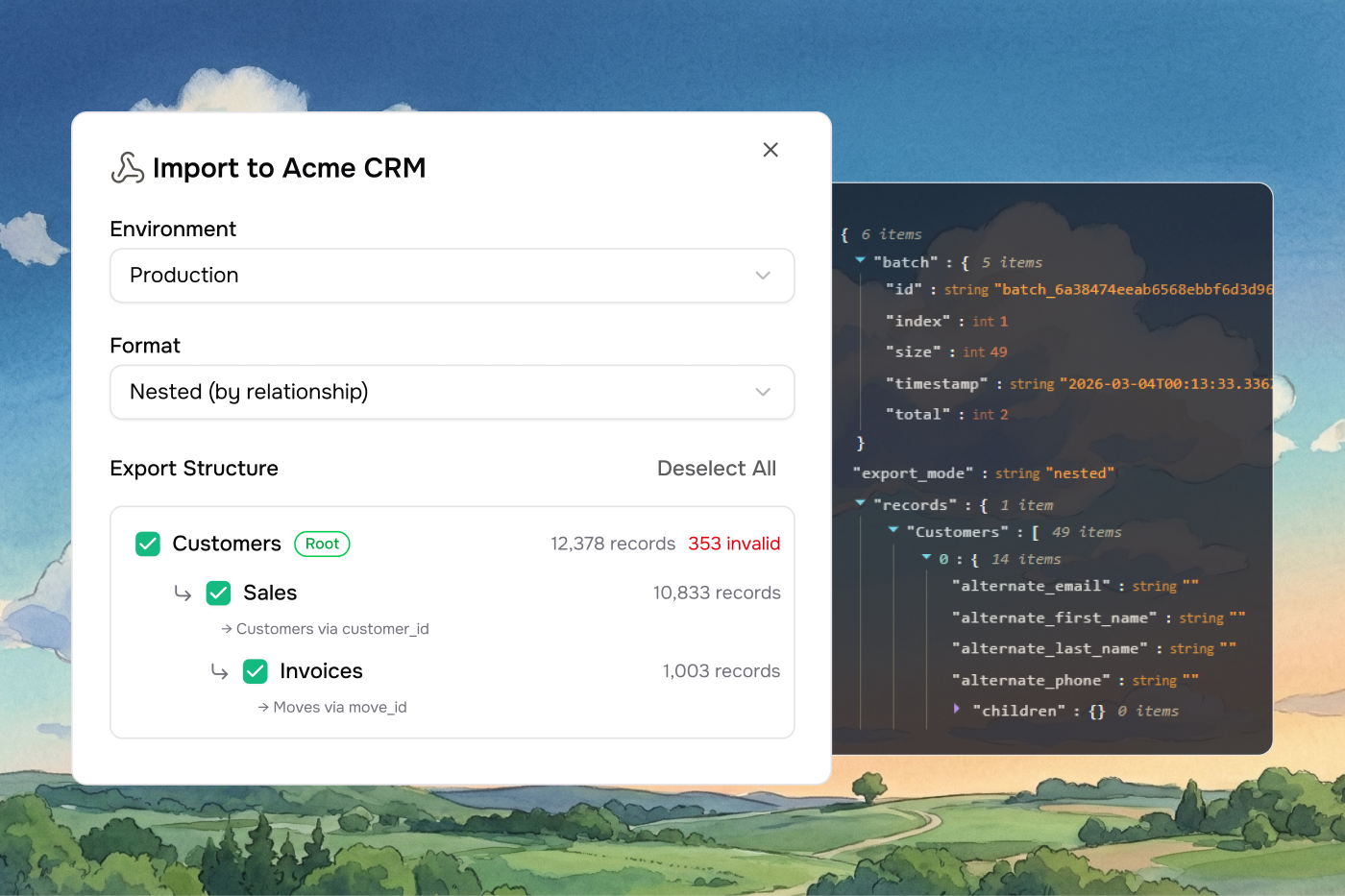
When you export a workbook with the **Webhook** option, Vern POSTs the cleaned rows to an endpoint you control. Set the endpoint up once and every future export streams to your app automatically.
 ## Events
| Event | When it fires |
| ---------------------------- | ----------------------------------------- |
| `workbook.production.export` | A production export from a workbook. |
| `workbook.preview.export` | A staging/preview export from a workbook. |
Configure separate endpoints for preview and production so test data never reaches your live database.
## Set up an endpoint
Webhook delivery is powered by [Svix](https://www.svix.com).
1. Go to **Settings → Webhooks**. This opens the Svix portal.
2. Click **Add endpoint** and paste the URL your app listens on.
3. Subscribe to `workbook.production.export` and/or `workbook.preview.export`.
4. Save.
When you next export a workbook, the matching endpoint receives the payload.
## Testing without an endpoint
For early testing, the Svix portal offers **Svix Play** — a temporary URL that catches and displays payloads in a web UI. Useful for proving your export fires before your real endpoint is wired up.
## Watch deliveries
From the Svix portal you can:
* See every webhook delivered to each endpoint.
* Inspect the exact payload sent.
* Replay failed deliveries.
* Grab the signing secret your developers need to verify webhooks.
## Verify the signature
Every webhook is signed. Verify the signature before trusting the payload:
```javascript theme={null}
import { Webhook } from "svix";
const secret = process.env.SVIX_WEBHOOK_SECRET;
app.post("/webhook", express.raw({ type: "application/json" }), (req, res) => {
const wh = new Webhook(secret);
let event;
try {
event = wh.verify(req.body, req.headers);
} catch {
return res.status(400).end();
}
// event is now trusted
res.status(200).end();
});
```
Grab the signing secret from your endpoint in the Svix portal.
## Retries
If your endpoint returns a non-2xx response, Svix retries automatically on a backoff schedule. Failed deliveries are visible in the Svix portal where you can replay them manually.
Make your handler idempotent — retries can deliver the same event twice.
***
## Payload format
Workbook exports come in one of two shapes, depending on whether you chose **flat** or **nested** mode in the export dialog. The `version` field tells you which one:
* `1.0` — flat
* `2.0` — nested
### Flat payload (v1.0)
Each sheet is a separate array of row objects. Good when sheets are independent or when you handle relationships in your own system.
```json theme={null}
{
"version": "1.0",
"workbook_id": "wb_abc123",
"external_id": "your-external-id",
"batch": {
"id": "batch_a1b2c3d4e5f6...",
"index": 0,
"total": 3,
"size": 150,
"timestamp": "2026-05-12T12:00:00.000Z"
},
"sheets": [
{
"id": "sheet_001",
"name": "Contacts",
"row_count": 150,
"start_row_index": 0,
"end_row_index": 149,
"data": [
{
"First Name": "Jane",
"Last Name": "Doe",
"Email": "jane@example.com",
"errors": [],
"row_index": 0
},
{
"First Name": "John",
"Last Name": "Smith",
"Email": "john@example.com",
"errors": ["Email domain not allowed"],
"row_index": 1
}
]
}
]
}
```
| Field | Type | Description |
| -------------------------- | ---------------- | -------------------------------------------------------- |
| `version` | `string` | Always `"1.0"` for flat payloads. |
| `workbook_id` | `string` | ID of the exported workbook. |
| `external_id` | `string \| null` | The `external_id` you passed when creating the company. |
| `batch` | `object` | Batch metadata (see [Batching](#batching)). |
| `sheets[]` | `array` | Sheet objects. |
| `sheets[].id` | `string` | Sheet ID. |
| `sheets[].name` | `string` | Sheet name. |
| `sheets[].row_count` | `number` | Number of rows in this batch. |
| `sheets[].start_row_index` | `number` | Starting row index (0-based). |
| `sheets[].end_row_index` | `number` | Ending row index (inclusive). |
| `sheets[].data[]` | `array` | Row objects: column keys + `errors` array + `row_index`. |
### Nested payload (v2.0)
Child sheets are nested under their parents using link rules. Good when sheets have foreign-key relationships and you want them grouped.
```json theme={null}
{
"version": "2.0",
"workbook_id": "wb_abc123",
"company_name": "Acme Corp",
"external_id": "your-external-id",
"export_mode": "nested",
"batch": {
"id": "batch_a1b2c3d4e5f6...",
"index": 0,
"total": 2,
"size": 50,
"timestamp": "2026-05-12T12:00:00.000Z"
},
"root_sheets": ["Departments"],
"data": {
"Departments": [
{
"Department Name": "Engineering",
"Location": "San Francisco",
"errors": [],
"row_index": 0,
"children": {
"Employees": [
{
"Name": "Jane Doe",
"Role": "Engineer",
"Department": "Engineering",
"errors": [],
"row_index": 0,
"children": {}
}
]
}
}
]
}
}
```
| Field | Type | Description |
| --------------- | ---------------- | ------------------------------------------------------------ |
| `version` | `string` | Always `"2.0"`. |
| `workbook_id` | `string` | ID of the exported workbook. |
| `company_name` | `string` | Name of the company that owns the workbook. |
| `external_id` | `string \| null` | The `external_id` you passed at company creation. |
| `export_mode` | `string` | Always `"nested"`. |
| `batch` | `object` | Batch metadata. |
| `root_sheets[]` | `string[]` | Names of the root sheets in the hierarchy. |
| `data` | `object` | Keyed by root sheet name. Each value is an array of records. |
Each nested record has its column values, an `errors` array, a `row_index`, and a `children` object keyed by child sheet name. Vern handles circular link rules cleanly — back-edges are treated as references and don't cause infinite recursion.
***
## Batching
Large exports split across multiple batches to stay within payload size limits. Each webhook delivery is one batch.
| Field | Type | Description |
| ----------------- | -------- | --------------------------------------------- |
| `batch.id` | `string` | Shared across all batches in the same export. |
| `batch.index` | `number` | 0-based index of this batch. |
| `batch.total` | `number` | Total number of batches. |
| `batch.size` | `number` | Records in this batch. |
| `batch.timestamp` | `string` | ISO 8601 creation time. |
**Flat (v1.0)** batches by payload size — each batch targets 256 KB with a 512 KB ceiling. Large sheets split across batches using `start_row_index` / `end_row_index`.
**Nested (v2.0)** batches by root record count — up to 50 roots per batch. A root and all its descendants are always delivered together.
### Reassembling batches
1. Group by `batch.id`.
2. Order by `batch.index`.
3. `batch.index === batch.total - 1` means it's the last one.
4. **Flat:** concatenate each sheet's `data` arrays in index order.
5. **Nested:** concatenate the `data` arrays for each root sheet name across batches.
## Best practices
* Verify the signature on every request.
* Make your handler idempotent — retries can deliver the same event twice.
* Return 200 quickly. Do heavy work asynchronously.
* Store the raw payload until you've fully processed it.
* Match the `external_id` back to your customer record on receipt.
## Events
| Event | When it fires |
| ---------------------------- | ----------------------------------------- |
| `workbook.production.export` | A production export from a workbook. |
| `workbook.preview.export` | A staging/preview export from a workbook. |
Configure separate endpoints for preview and production so test data never reaches your live database.
## Set up an endpoint
Webhook delivery is powered by [Svix](https://www.svix.com).
1. Go to **Settings → Webhooks**. This opens the Svix portal.
2. Click **Add endpoint** and paste the URL your app listens on.
3. Subscribe to `workbook.production.export` and/or `workbook.preview.export`.
4. Save.
When you next export a workbook, the matching endpoint receives the payload.
## Testing without an endpoint
For early testing, the Svix portal offers **Svix Play** — a temporary URL that catches and displays payloads in a web UI. Useful for proving your export fires before your real endpoint is wired up.
## Watch deliveries
From the Svix portal you can:
* See every webhook delivered to each endpoint.
* Inspect the exact payload sent.
* Replay failed deliveries.
* Grab the signing secret your developers need to verify webhooks.
## Verify the signature
Every webhook is signed. Verify the signature before trusting the payload:
```javascript theme={null}
import { Webhook } from "svix";
const secret = process.env.SVIX_WEBHOOK_SECRET;
app.post("/webhook", express.raw({ type: "application/json" }), (req, res) => {
const wh = new Webhook(secret);
let event;
try {
event = wh.verify(req.body, req.headers);
} catch {
return res.status(400).end();
}
// event is now trusted
res.status(200).end();
});
```
Grab the signing secret from your endpoint in the Svix portal.
## Retries
If your endpoint returns a non-2xx response, Svix retries automatically on a backoff schedule. Failed deliveries are visible in the Svix portal where you can replay them manually.
Make your handler idempotent — retries can deliver the same event twice.
***
## Payload format
Workbook exports come in one of two shapes, depending on whether you chose **flat** or **nested** mode in the export dialog. The `version` field tells you which one:
* `1.0` — flat
* `2.0` — nested
### Flat payload (v1.0)
Each sheet is a separate array of row objects. Good when sheets are independent or when you handle relationships in your own system.
```json theme={null}
{
"version": "1.0",
"workbook_id": "wb_abc123",
"external_id": "your-external-id",
"batch": {
"id": "batch_a1b2c3d4e5f6...",
"index": 0,
"total": 3,
"size": 150,
"timestamp": "2026-05-12T12:00:00.000Z"
},
"sheets": [
{
"id": "sheet_001",
"name": "Contacts",
"row_count": 150,
"start_row_index": 0,
"end_row_index": 149,
"data": [
{
"First Name": "Jane",
"Last Name": "Doe",
"Email": "jane@example.com",
"errors": [],
"row_index": 0
},
{
"First Name": "John",
"Last Name": "Smith",
"Email": "john@example.com",
"errors": ["Email domain not allowed"],
"row_index": 1
}
]
}
]
}
```
| Field | Type | Description |
| -------------------------- | ---------------- | -------------------------------------------------------- |
| `version` | `string` | Always `"1.0"` for flat payloads. |
| `workbook_id` | `string` | ID of the exported workbook. |
| `external_id` | `string \| null` | The `external_id` you passed when creating the company. |
| `batch` | `object` | Batch metadata (see [Batching](#batching)). |
| `sheets[]` | `array` | Sheet objects. |
| `sheets[].id` | `string` | Sheet ID. |
| `sheets[].name` | `string` | Sheet name. |
| `sheets[].row_count` | `number` | Number of rows in this batch. |
| `sheets[].start_row_index` | `number` | Starting row index (0-based). |
| `sheets[].end_row_index` | `number` | Ending row index (inclusive). |
| `sheets[].data[]` | `array` | Row objects: column keys + `errors` array + `row_index`. |
### Nested payload (v2.0)
Child sheets are nested under their parents using link rules. Good when sheets have foreign-key relationships and you want them grouped.
```json theme={null}
{
"version": "2.0",
"workbook_id": "wb_abc123",
"company_name": "Acme Corp",
"external_id": "your-external-id",
"export_mode": "nested",
"batch": {
"id": "batch_a1b2c3d4e5f6...",
"index": 0,
"total": 2,
"size": 50,
"timestamp": "2026-05-12T12:00:00.000Z"
},
"root_sheets": ["Departments"],
"data": {
"Departments": [
{
"Department Name": "Engineering",
"Location": "San Francisco",
"errors": [],
"row_index": 0,
"children": {
"Employees": [
{
"Name": "Jane Doe",
"Role": "Engineer",
"Department": "Engineering",
"errors": [],
"row_index": 0,
"children": {}
}
]
}
}
]
}
}
```
| Field | Type | Description |
| --------------- | ---------------- | ------------------------------------------------------------ |
| `version` | `string` | Always `"2.0"`. |
| `workbook_id` | `string` | ID of the exported workbook. |
| `company_name` | `string` | Name of the company that owns the workbook. |
| `external_id` | `string \| null` | The `external_id` you passed at company creation. |
| `export_mode` | `string` | Always `"nested"`. |
| `batch` | `object` | Batch metadata. |
| `root_sheets[]` | `string[]` | Names of the root sheets in the hierarchy. |
| `data` | `object` | Keyed by root sheet name. Each value is an array of records. |
Each nested record has its column values, an `errors` array, a `row_index`, and a `children` object keyed by child sheet name. Vern handles circular link rules cleanly — back-edges are treated as references and don't cause infinite recursion.
***
## Batching
Large exports split across multiple batches to stay within payload size limits. Each webhook delivery is one batch.
| Field | Type | Description |
| ----------------- | -------- | --------------------------------------------- |
| `batch.id` | `string` | Shared across all batches in the same export. |
| `batch.index` | `number` | 0-based index of this batch. |
| `batch.total` | `number` | Total number of batches. |
| `batch.size` | `number` | Records in this batch. |
| `batch.timestamp` | `string` | ISO 8601 creation time. |
**Flat (v1.0)** batches by payload size — each batch targets 256 KB with a 512 KB ceiling. Large sheets split across batches using `start_row_index` / `end_row_index`.
**Nested (v2.0)** batches by root record count — up to 50 roots per batch. A root and all its descendants are always delivered together.
### Reassembling batches
1. Group by `batch.id`.
2. Order by `batch.index`.
3. `batch.index === batch.total - 1` means it's the last one.
4. **Flat:** concatenate each sheet's `data` arrays in index order.
5. **Nested:** concatenate the `data` arrays for each root sheet name across batches.
## Best practices
* Verify the signature on every request.
* Make your handler idempotent — retries can deliver the same event twice.
* Return 200 quickly. Do heavy work asynchronously.
* Store the raw payload until you've fully processed it.
* Match the `external_id` back to your customer record on receipt.